A chatbot is a computer program used for interactions with humans via textual or auditory methods. To start with, I have used textual methods for the interactions between human and a chatbot.
Chatbots basically have two responsibilities
- Understanding the intention of the user
- Uttering a appropriete response to the user
These could be fullfilled with natural language understanding component Rasa NLU and dialogue management component Rasa Core which together will form the Rasa Stack.
INTENT CLASSIFICATION
Rasa NLU uses the intents concept to understand what the user’s intention is or to describe how user messages should be classified.
All we need is a training data file in which we can describe intents and example texts for the Rasa trainer to build a model which can further be used to interpret intents for different text messages from the user.
How did I decide upon the intents for my training data?
(1) I chose intents greet, bland_greeting, show_menu, order_food, goodbye as per my requirement.
The text messages for each intent is purely imaginative about what are all the ways a user could express his/her wants.
For example:
A user might tell “show me the menu” or “menu card” or “I want to have a look at the menu card”.
Although the text messages are of different forms, the intention is the same and the chatbot needs to recognize this. So we need to put all our imaginations to the training data file.
You can have a look at the data/training_data.json file.
(2) We should not have any similar intents which might lead to inaccuracy. Imagine we have an intent “mood” which will identify if the user wants to eat and an intent order_food through which we could process an order. Consider the user is casually wanting to tell the bot “I would like to eat”(intent:mood) and specifically tell “I would like to have pizza”(intent:order_food). However Rasa NLU perceives these messages to be similar. So I have created an intent order_food which unifies both the intents.
(3) Intents need to have equal number of text examples to prevent the classifier from being biased or sometimes less number of examples might lead to inaccuracy too.
ENTITY EXTRACTION:
After identifying user’s intents, we need to extract important information from the user’s message for the bot to respond in a relevant manner. We need to choose the right entity extractor which can target our requirements.
In the food_ordering_chatbot, I have extracted the names of the food to process the order further.
For example:
To provide the order confirmation, I needed to extract the food item the user wants.
text:I would like to have pizza
Value:pizza
Entity name:food_item
Ner_crf component will train a conditional random field which is then used to tag entities in the user messages. It already exists as a component in spacy_sklearn template(which is explained later in the training) . This component is trained from scratch as part of the NLU pipeline and so it is solely our responsibilty to provide the entity value and name for the training data.
TRAINING THE NLU MODEL
Once the training data is ready, we need to move to the next step which is to train our data.
Rasa Nlu provides us with a Trainer class.
To train a nlu model(Refer nlu_model.py), we need 3 parameters.
- Data – The training data file which we created earlier with all the necessary intents and entities. The load_data function of the trainer class reads the data from the respective paths and returns a TrainingData object.
“data”:”./data/training_data.json” - Pipeline – A pipeline is made up of components. We need to specify what feature extractors or featurizers are going to be used to crunch text messages and extract desired information. Each component is responsible for a specific NLP operation. Rasa NlU provides us with templates which already have components configured. I have chosen the spacy_sklearn template as I had very less training data and to make use of pretrained word embeddings.
pipeline”:”spacy_sklearn” - The train function of the trainer class iterates through the pipeline and performs the NLP task defined by the components in the pipeline and converts into a Machine learning model. Output of one component in a pipeline is fed to the input of the next component in that pipeline.
- Path – Directory where we need to persist our model after the training so that the model could be loaded and used for performing interpretations. “path”:”./models/nlu”
The final output after training through all the pipeline components is an interpreter object. We would have a lot of files generated by the interpreter object which we can view by looking at the model generated in the path specified.We can check if the model could classify the intents correctly by parsing messages using an interpreter.
For example: A user’s text reading “i would like to have fish” which was not seen by the bot during training , when parsed using an interpreter gave the following result.

The text is preprocessed by tokenizing the message by spacy_tokenizer , extracting the entities using ner_CRF entity extractor and then classifying the intents using intent_classifier_sklearn. All of these components form a part of spacy_sklearn pipeline.
DIALOGUE MANAGEMENT MODEL:
We are only half way through with intent classification and entity extraction in building a bot . Now we need a dialogue management model to direct the chatbot to give relavant response to user’s messages. Rasa core has simplified this by providing major functionalities.
There are only 3 steps for building a chatflow for the bot.
STEP 1 : The chatbot needs to know the environment around it. To do this, I included a domain file which defines the universe in which the bot operates. This file contains the references to our intents, entities, slots, custom actions. As we already saw about intents and entities, we will dive into slots and actions. Sl
Slots are bot’s memory.
For example-
slots:
food_item:
type: text
where food_item is the name of the slot and of type text. We could add any number of slots we need by giving them a name and relevant type. We can retrieve the slots using a tracker in custom actions.
When the user sends a messge “get me a donut”
The entity food_item : burger is extracted and stored for the bot to remember the order to process further operations.
Actions can be of three types- Utter actions, Custom actions, default actions.
We can just use templates for utter_actions. We can make the bot do anything we want using the custom actions. I have used two custom actions in the food ordering bot one of which fetches the food items from an api and the other fetches the user’s order item and processes it in sending the confirmation message.(check actions.py)
STEP 2: A training example for the Rasa Core dialogue system is called a story. We can initially train(train_init.py) the dialogue model by providing simple stateless stories which involves only intents and their respective actions. After training, it combines the stories we have provided into longer dialogues and is saved to models/dialogues.
Mark down format
For example,
## story 01
* greet
-utter_greet
## story 02
* goodbye
-utter_goodbye
We can also generate stories by training the bot online. We can then use the interactive learning(train_online.py) to correct the bot incase it makes mistakes and generate stories which we could add in our training stories data. Have a look at the generated stories in data/stories.md file.
This is an easy option compared to writing stories all by ourself.
You can skip the second step if you already have your stories ready.
Step 3: The next step is to train our dialogue management model(dialogue_management_model.py) with the domain file(food_domain.yml), the stories data and persist the model to models/dialogue path. To train the model, Rasa provides us with an agent which is an excellent interface for functionalities like training, loading and using a model.
agent=Agent(domain_file, policies= [MemoizationPolicy(),KerasPolicy()])
The policy class decides which action to take at every step in the conversation. The memorization policy memorizes the conversations in the training data and Keras policy will include the neural network to select the next action. We can override the settings of the keras policy to fit our requirements.
agent.train(training_data_file,max_history=3,epochs=86,batch_size=10,validation_split=0.2,augmentation_factor=50)
Once the model is trained , we can look at the generated files in the path where we persisted our model.
STEP 4: Now we are ready to test the model. We just have to load the model from model/dialogues using agent’s load function and make use of agent’s console input channel to provide interactions through a console.
Now when a user message is recieved, it is passed to an interpreter which converts the message into a dictionary including the message, the intent and entities that were found and is passed to the tracker. The tracker is the object which keeps track of the conversation state and receives the information that a new message has arrived and policy will receive the current state of the tracker,chooses which action to take next and the chosen action is logged by the tracker and sent to the user as a response.
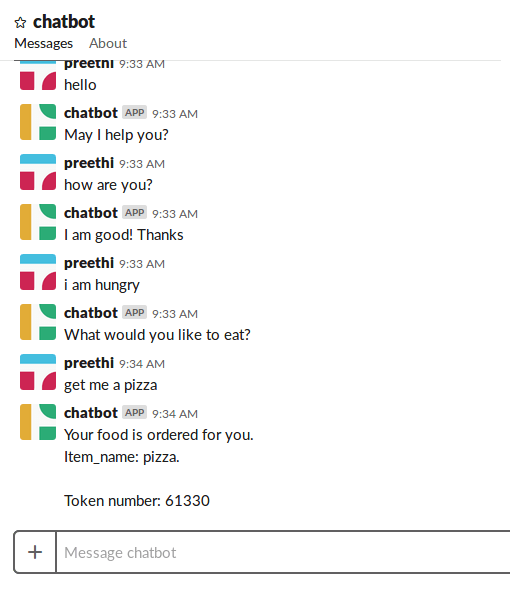
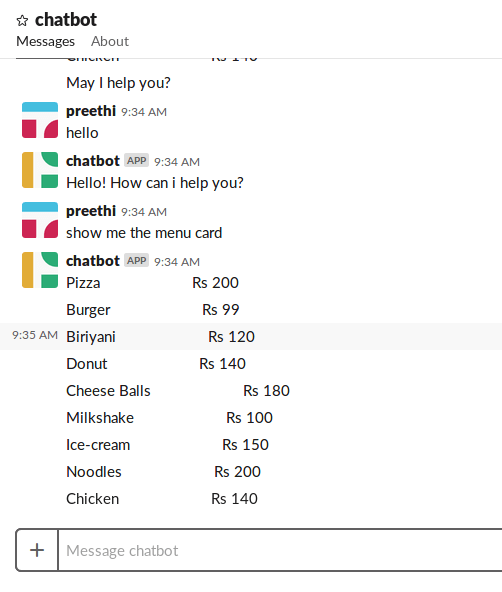
Link to the full code – https://github.com/PreethiReddy270916/Rasa-chatbot

 Game Of Bots